
PDF Word Counter - Make Your Document Management Easy
Keeping track of word counts in a PDF document is crucial when sharing or editing it. Counting manually can consume a lot of time. It is always better to use reliable tools that can quickly and accurately count words in your documents. That’s where a PDF Word Counter comes in.
If you’re a beginner or a student looking for a simple, secure, and free tool, try SafePDFKit’s Word Counter Tool, which is fast, accurate, and straightforward.
How it works:
-
You upload your PDF file onto the SafePDFKit Word Counter page.
-
The tool automatically processes your file and displays the total word count instantly.
-
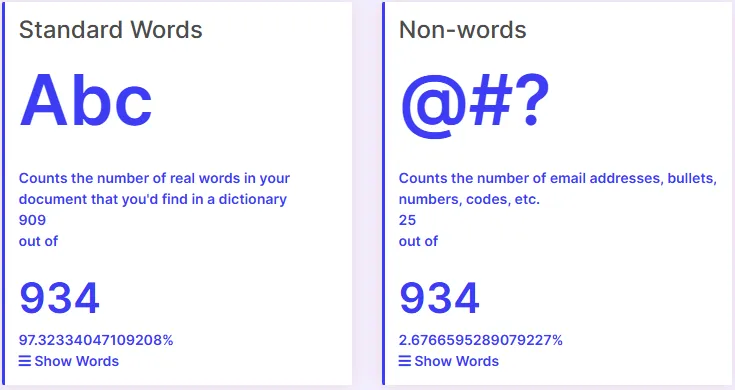
It shows you a list of all the standard or nonstandard words in your document, making it easy to see your content’s structure and identify overused words or symbols.
Isn’t that seeming easy? Without wasting time, you can quickly find out the number of words and clean up your document without any complicated steps. This way, you can work in an organized manner when it comes to counting words in a document.
Standard and Nonstandard Word Counts
SafePDFKit’s Word Counter shows you the difference between standard words like regular alphabets and nonstandard words, such as symbols, hashtags, numbers, or special characters. You can easily see the list of words by clicking the ‘Show’ button. This helps you avoid overusing certain words or symbols in your document.
Why Word Count Matters
In today’s digital world, knowing the length of your document helps you refine your content and ensures your message is clear without unnecessary repetitions.
For writers and editors: Long articles might lose the interest of readers, while very short articles may not fully convey the message.
For businesses: Many industries require documents to meet specific length standards for legal or official reasons. Accurate word counts help avoid mistakes and unnecessary content.
For marketers: Blog articles or social media posts need to be of the right length; otherwise, engagement and SEO can be affected.
For students and teachers: Assignments often have word limits. Tracking accurately keeps students on track and helps teachers assess work fairly.
Knowing your word count helps improve the quality, clarity, and structure of your content. And with tools like SafePDFKit’s Word Counter, you get precise results every time.
How a PDF Word Counter Works
A PDF Word Counter scans your document and focuses on the text to count both standard and nonstandard words. It ignores images or graphics. All this happens automatically as soon as you upload your file.
What Makes a PDF Word Counter Effective?
The best tools have features that make your work easier:
✔ Accurate counting: Precise results even with complex PDFs.
✔ Simple to use: Upload your PDF and get results instantly.
✔ Detailed reports: See lists of words, keyword usage, and more.
And the best part? No complicated steps or extra software are needed at safepdfkit. This simple process can speed up your document management significantly.
A PDF Word Counter helps by:
-
Saving time - automation speeds up the process.
-
Ensuring accuracy - fewer mistakes.
-
Improving content planning - insights into word usage help create better content.
-
Supporting decision-making - knowing your document’s size helps in planning, editing, and review tasks.
Top Tools for PDF Word Counting
Adobe Acrobat Pro and Foxit are great for advanced features and offline work.
SafePDFKit, Smallpdf, or Sejda are perfect for quick, casual use.
Google Docs or Microsoft Word can also count words when working with PDFs.
How to Choose Your PDF Word Counter
-
Pick the right tool - SafePDFKit is ideal for fast, secure, and free counting.
-
Upload your PDF to the website.
-
Wait for the tool to process your file automatically.
-
Review the total word count and see the list of words in your document.
-
Use the insights to improve your content or meet guidelines.
-
Repeat as needed for multiple files or updates.
Where a PDF Word Counter Comes in Handy
These tools are useful everywhere:
Content creation: Writers can track article or story lengths.
Legal work: Ensuring documents meet required standards.
Education: Students stay within guidelines, teachers save time.
Business documents: Making reports and proposals easier to manage.
Research: Analyzing the size of papers and reports.
Final Thoughts: Smarter Document Management
A PDF Word Counter is small but powerful. Manage your documents smartly with SafePDFKit’s Word Counter by simply uploading your file, and it refines your content instantly and efficiently.